|
|
| (40 intermediate revisions by the same user not shown) |
| Line 1: |
Line 1: |
| − | {{MoreDetails|Features|
| |
| − | Some key features of the exporter include:
| |
| − | * Geometry import and export with their modifiers, keyed and physics animation
| |
| − | * Add POV-Ray specific non mesh primitives (never show tesselation)
| |
| − | * Instances
| |
| − | * Hair particles
| |
| − | * Smoke simulations
| |
| − | * Atmospheric media (volume fog)
| |
| − | * HDRI environment mapping
| |
| − | * Aperture depth of field
| |
| − | * Material properties such as filtering, emission, translucency, subsurface scattering, glass fog (tinted absorption), blurry/glossy reflections...
| |
| − | * Procedural textures (emulated from Blender Internal and POV-Ray native)
| |
| − | * Image textures
| |
| − | * Texture influence channels: Alpha ; Diffuse ; Bump ; Specular ; Mirror (uses same channel as specular)
| |
| − | * Global Illumination: Radiosity (Indirect Lighting) ; Photons caustics (reflect/refract); meshlights
| |
| − | * Custom POV-Ray code input giving access to any POV-Ray feature not supported by the exporter.
| |
| − |
| |
| − | POV-Ray 3.7 features
| |
| − | volumetrics and media (scattering/absorbing), blurry reflections(uberpov), ghosting for motion blur(uberpov), micropoly displacement (HGPOV) etc.
| |
| − | }}
| |
| − |
| |
| | <!--<wikinav>---> | | <!--<wikinav>---> |
| | <br> | | <br> |
| − | <table width=100% border=0 cellspacing=0 cellpadding=5> | + | <table width=100% border=0 cellspacing=0 cellpadding=5 style="text-align:center;"> |
| | <tr><td width=33% bgcolor=#EEEEEF> | | <tr><td width=33% bgcolor=#EEEEEF> |
| − | <font size="+2">[[HowTo:Use_POV-Ray_with_Blender|User's page]]</font size="+2"></td> | + | <font size="+2">[[HowTo:Use_POV-Ray_with_Blender|▼ Users]]</font size="+2"></td> |
| − | <td width=33% align=center>[[File:POVExporterLogo.png|center|200px|link=https://povconverter.wordpress.com]]</td> | + | <td width=33% align=center>[[File:POVExporterLogo.png|center|100px|link=https://extensions.blender.org/add-ons/povable]]</td> |
| − | <td width=33% bgcolor=#EEEEEF align=right> | + | <td width=33% bgcolor=#EEEEEF align=center> |
| − | <font size="+2">[[HowTo:Use_POV-Ray_with_Blender/Developers_page|Developer's page]]</font size="+2"></td></tr> | + | <font size="+2">[[HowTo:Use_POV-Ray_with_Blender/Developers|Developers ►]]</font size="+3"></td></tr> |
| | </table> | | </table> |
| | <!--</wikinav>---> | | <!--</wikinav>---> |
| Line 46: |
Line 25: |
| | *--- | | *--- |
| | *design ideas | | *design ideas |
| − | *[[Media:regression_and_test_blendfiles.zip|regression files]] | + | *[[Media:test_blendfiles.zip|regression files]] |
| | </div> | | </div> |
| | | | |
| Line 52: |
Line 31: |
| | <div class="clearBoth"></div> | | <div class="clearBoth"></div> |
| | <div style="text-align:center; border-top: grey solid 1px;"> | | <div style="text-align:center; border-top: grey solid 1px;"> |
| − | <ul style="font-size:1.1em; list-style-type:none;"><li><font size="+2">[http://developer.blender.org/diffusion/BA/history/master/render_povray/ Latest News]</font size="+2"></li>
| + | <font size="+2"><center>[https://projects.blender.org/extensions/render_povray/commits/branch/main/source News]|[irc://irc.libera.chat/povray Chat]|[https://projects.blender.org/extensions/render_povray.rss RSS]|[https://blenderartists.org/tag/povray Forum]</center></font size="+2"> |
| − | <li>[irc://irc.freenode.org/blenderpovray Chat room, IRC: #blenderpovray at freenode]</li>
| |
| − | <li>[http://git.blender.org/gitweb/gitweb.cgi/blender-addons.git/atom/refs/heads/master?f=render_povray RSS feed]</li>
| |
| − | <li>[http://blenderartists.org/forum/group.php?groupid=79 Forum Group]</li></ul>
| |
| | </div> | | </div> |
| | | | |
| | + | {{MoreDetails|Features| |
| | + | Some key features of the exporter include: |
| | + | * Geometry import and export with their modifiers, keyed and physics animation |
| | + | * Add POV-Ray specific non mesh primitives (never show tesselation) |
| | + | * Instances |
| | + | * Hair particles |
| | + | * Smoke simulations |
| | + | * Atmospheric media (volume fog) |
| | + | * HDRI environment mapping |
| | + | * Aperture depth of field |
| | + | * Material properties such as filtering, emission, translucency, subsurface scattering, glass fog (tinted absorption), blurry/glossy reflections... |
| | + | * Procedural textures (emulated from Blender Internal and POV-Ray native) |
| | + | * Image textures |
| | + | * Texture influence channels: Alpha ; Diffuse ; Bump ; Specular ; Mirror (uses same channel as specular) |
| | + | * Global Illumination: Radiosity (Indirect Lighting) ; Photons caustics (reflect/refract); meshlights |
| | + | * Custom POV-Ray code input giving access to any POV-Ray feature not supported by the exporter. |
| | | | |
| | + | POV-Ray 3.7 features |
| | + | volumetrics and media (scattering/absorbing), blurry reflections(uberpov), ghosting for motion blur(uberpov), micropoly displacement (HGPOV) etc. |
| | + | }} |
| | | | |
| | + | <br> |
| | + | <div style="float:right">__TOC__</div> |
| | + | <br> |
| | [[HowTo:Use_POV-Ray_with_Blender#Standard_Script_Information|Standard Script Information]] at the bottom of this page. | | [[HowTo:Use_POV-Ray_with_Blender#Standard_Script_Information|Standard Script Information]] at the bottom of this page. |
| | | | |
| − | = POV-Ray 3.7 Exporter for Blender 2.8x =
| + | POV-Ray is an an SDL based (Scene Description Language) rendering engine with a long history that makes it very stable and feature rich. The latest version of POV-Ray 3.7 can be found at: [http://www.povray.org/download/ povray.org] |
| − | POV-Ray is an an SDL based (Scene Description Language) rendering engine with a long history that makes it very stable and feature rich. The latest version of POV-Ray 3.7 can be found at: http://www.povray.org/download/<br/> | + | = POV-Ray 3.8 Exporter for Blender 4.2x/4.3x/4.4x/...and later = |
| − | Though this exporter is currently shipped with any official Blender builds, the POV-Ray 3.7 renderer itself is not included in Blender like some other renderers are (Cycles or Freestyle for instance). Instead, users are just expected to download and install it for themselves: See the [[HowTo:Install_POV|Installation]] page for platform specific details on how to get, install or build POV-Ray. | + | Starting from Blender 4.2, as an entry point, POV@Ble downloads, links to sources and to this documentation are now hosted on the new [https://extensions.blender.org/add-ons/povable/ Blender Extensions Platform] |
| | + | = POV-Ray 3.7 Exporter for Blender 2.79/2.8x/4.1x = |
| | + | Though this exporter used to be shipped with any official Blender build, the POV-Ray 3.7 renderer itself was not included in Blender like some other renderers were (Cycles or Freestyle for instance). Instead, users were just expected to download and install it for themselves: See the [[HowTo:Install_POV|Installation]] page for platform specific details on how to get, install or build POV-Ray. |
| | | | |
| | =Download= | | =Download= |
| Line 72: |
Line 72: |
| | The POV-Ray exporter is shipped with every official Blender release, so you can start using it directly. | | The POV-Ray exporter is shipped with every official Blender release, so you can start using it directly. |
| | | | |
| − | However, after checking the logs of [http://developer.blender.org/diffusion/BA/history/master/render_povray/ every commit to the source] of the script for new features or bug fixes, if you find out you need an update, | + | However, after checking the logs of [https://projects.blender.org/extensions/render_povray/commits/branch/main/source every commit to the source] of the script for new features or bug fixes, if you find out you need an update, |
| | | | |
| | *You can download all the script at once by clicking ''<u>snapshot</u>'' | | *You can download all the script at once by clicking ''<u>snapshot</u>'' |
| − | [http://git.blender.org/gitweb/gitweb.cgi/blender-addons.git/tree/refs/heads/master:/render_povray on this page]. | + | [https://projects.blender.org/extensions/render_povray/archive/main.zip here]. |
| | | | |
| − | *or download a fresh blender build including scripts from generally a few days before
| |
| − | [http://builder.blender.org/download here].
| |
| | | | |
| | = Usage = | | = Usage = |
| Line 479: |
Line 477: |
| | *Option to add comments to POV-Ray file. | | *Option to add comments to POV-Ray file. |
| | *Option to write long lists of coordinates in one line for easier browsing of the POV file (and slightly faster parsing by the renderer) | | *Option to write long lists of coordinates in one line for easier browsing of the POV file (and slightly faster parsing by the renderer) |
| − | *Choice of [[Reference:Global_Settings#Charset|character encoding]] | + | *Choice of [[Reference:Global_Settings#Charset|character encoding]] is automatic for versions above 3.8 |
| | | | |
| | == Scene Properties == | | == Scene Properties == |
| Line 760: |
Line 758: |
| | | | |
| | {| width=100% | | {| width=100% |
| − | | valign=top | '''1.''' Navigate the text window menu to display the text properties {{Menu|View}}{{Submenu|Properties}} | + | | valign=top | '''1.''' Navigate the text window menu to display the text properties {{Menu|View}}{{Submenu|Sidebar}} or use the {{Shortcut/Keypress|⌘ Ctrl}}{{Shortcut/Keypress|T}} shortcut |
| | | [[File:Pov_ReplaceWith01.png|thumb|400px|1]] | | | [[File:Pov_ReplaceWith01.png|thumb|400px|1]] |
| | |- | | |- |
| | | valign=top | '''2.''' In the text view properties option, you can chose to render 3d view and/or text. Enable ''Both''. | | | valign=top | '''2.''' In the text view properties option, you can chose to render 3d view and/or text. Enable ''Both''. |
| − | | [[File:Pov_ReplaceWith02.png|thumb|400px|2]]
| |
| | |- | | |- |
| | | valign=top | '''3.''' Syntax highlight detects the following file extensions: | | | valign=top | '''3.''' Syntax highlight detects the following file extensions: |
| Line 832: |
Line 829: |
| | The rendered plane is actually infinite, but represented by a proxy in the 3D view, which is just very big, but still finite. Please report if you'd rather have a différent default scale. | | The rendered plane is actually infinite, but represented by a proxy in the 3D view, which is just very big, but still finite. Please report if you'd rather have a différent default scale. |
| | {| style="width:100%" border="0" | | {| style="width:100%" border="0" |
| − | |[[File:PovInfinitePlane1.png|400px|]]|[[File:PovInfinitePlane2.png|400px|]] | + | |[[File:PovInfinitePlane1.png|400px|]]|[[File:PovInfinitePlane2.png|320px|]] |
| | |} | | |} |
| | <br/> | | <br/> |
| Line 959: |
Line 956: |
| | {| style="width:100%" border="0" | | {| style="width:100%" border="0" |
| | |[[File:PovLoft1.png|400px|]]|[[File:PovLoft2.png|400px|]] | | |[[File:PovLoft1.png|400px|]]|[[File:PovLoft2.png|400px|]] |
| | + | |} |
| | + | |
| | + | ==Parametric surfaces== |
| | + | The primitive requiring user to activate Add Mesh: Extra Objects addon is Parametric surfaces: that other addon was indeed very well suited to create the 3D view mesh preview, so there was no need to reinvent the wheel. However it is considered bad practice for an addon to enforce activation of another addon so that decision has to be left to the user of activating that other dependency, even though it's still internally shipped with Blender and nothing else has to be done but mere checking of a box at first run (next sessions will remember it). The only consequence is that If you were to enable all addons, Blender would take slightly longer to startup. |
| | + | |
| | + | *Parametric |
| | + | {| style="width:100%" border="0" |
| | + | |[[File:PovParametric1.png|400px|]]|[[File:PovParametric2.png|400px|]] |
| | |} | | |} |
| | <br/> | | <br/> |
| Line 1,060: |
Line 1,065: |
| | }} | | }} |
| | | | |
| − | =Standard Script Information= | + | =POV-Ray specific concepts= |
| − | {{ScriptInfo
| + | [[File:POV_shaders_logics.png|center|600px]] |
| − | |name= render_povray
| + | ==object (geometry+material)== |
| − | |tooltip= Renders scenes with POV-Ray 3.7
| + | Objects are the building blocks of your scene. There are a lot of different types of objects supported by POV-Ray. they are also sometimes called primitives. The mesh object often exported from Blender is just one of the possible primitives supported by POV, but it's one that allows to make the most profitable use of the exporter because a sculpted mesh is easily done in Blender interface and practically impossible to do with POV-Ray alone. The second stage of the exporter's development will allow to use more POV native primitives through Blender interface. |
| − | |menu= Renderer rolldown menu
| + | |
| − | |usage= If POV-Ray 3.7 is installed, activate the addon in the menu {{Menu|Edit}}{{Submenu|<u>P</u>references}}. Choose it as the renderer and render with {{Shortcut/Keypress|F12}}.
| + | In any case the pov object contains the geometry and can also have the material block, if there is one, at the same hireachical level. This type of construction could be compared to Blender use of "Object Material" |
| − | |version= 0.0.9
| + | |
| − | |author= Campbell Barton, Silvio Falcinelli, Maurice Raybaud, Constantin Rahn, Bastien Montagne, Leonid Desyatkov
| + | ==material (interior+texture)== |
| − | |blender= 2.57
| + | In POV-Ray, there used to be only texture properties inside an object and interior properties such as Index of Refraction could be declared in the same block. |
| − | |category= Render
| + | |
| − | |license= GPL
| + | |
| − | |distribution= Release
| + | But the developers thought "It is totally illogical to have a ray enter an object with one index or refraction and then recalculate with another index" in the case of multitextured objects. |
| − | |note= After May the 10th 2011, some development to the script limited backwards compatibility: If you set up some files prior to that and always use the latest exporter from SVN. It is advised to run the update script and resave your scene with the new version: get to the search bar with {{Shortcut/Keypress| Space }} and type pov to access this command.
| + | |
| − | |exe= (Python script)+ POV-Ray 3.7
| + | Nowadays, POV-Ray texture still contains the properties ruling interaction between an object and its environment, such as reflectivity, roughness etc. while Interior stands for internal properties that have an incidence on the light that crosses the surface: index of refraction, media scattering or absorbing light, etc. |
| − | |download=
| + | |
| − | Here are the logs of every commit to the source:
| + | For easier reference with a single identifier in a texture library, a wrapper around texture and interior has been created which we call 'material' |
| | + | |
| | + | ==texture (pigment+normal+finish)== |
| | + | POV-Ray textures are combinations of pigments, normals, and finishes. |
| | + | |
| | + | Pigment is the color or pattern of colors inherent in the material. |
| | + | Normal is a method of simulating various patterns of bumps, dents, ripples or waves by modifying the surface normal vector. |
| | + | Finish describes the reflective properties of a material. |
| | + | |
| | + | ====pigment / normal==== |
| | + | *color |
| | + | *patterns/bitmap |
| | + | ====finish==== |
| | + | A little more powerful as it can be patterned, that is two finishes can be mixed depending on values of a bitmap file |
| | + | |
| | + | ==texture_list== |
| | + | If the texture is not put inside a material statement, it can be put directly inside the geometry of the object, it allows to apply different textures to different parts of the object through a texture list and texture indices assigned per face. |
| | + | |
| | + | The exporter exploits this feature for meshes with several materials. This type of construction could be compared to Blender's Data material. However, in POV-Ray, all the textures still share one common set of interior properties per object. |
| | + | |
| | + | ==The most complex blender materials case== |
| | + | Blender materials being able to map alpha, diffuse, normal, specular, specular hardness, specular color each depending on a different bitmap file value, they are in their native logic, impossible to translate in POV (e-g: map with various specular colors) |
| | + | What most complex material case remains translatable? |
| | + | |
| | + | On various parts of a mesh, thanks to texture lists, |
| | | | |
| − | [http://developer.blender.org/diffusion/BA/browse/master/render_povray/]
| + | shader emulation alpha to filter |
| | + | pigment normal |
| | + | diffuse color |
| | + | blurred reflection |
| | + | all this duplicated with min and max specular |
| | + | mapped at both extremes of a bitmap or procedural value. |
| | | | |
| − | *You can download all the script at once by clicking ''snapshot'' here:
| + | a colored specular, which is the NPR feature turns off texture influences. |
| | + | not to be confused with metallic keyword which does a photorealistic colored spec and still allows texture influences |
| | | | |
| − | [http://git.blender.org/gitweb/gitweb.cgi/blender-addons.git/tree/refs/heads/master:/render_povray]
| |
| | | | |
| − | *or download a fresh blender build including scripts from generally a few days before here:
| + | what is impossible in POV: map with various specular color What remains: most complex exported material case |
| | | | |
| − | [http://builder.blender.org/download/]
| + | =Renderer versions= |
| | + | UberPOV features can be written to a POV file inside the scope of a specific condition to enable the files to be retro compatible with POV-Ray 3.7 syntax: |
| | | | |
| − | *And of course, don't forget to [http://www.povray.org/download/ download and install POV-Ray] itself !
| + | <source lang="pov"> |
| | + | reflection { 1 metallic |
| | + | #ifdef(unofficial) |
| | + | #if(unofficial = "patch") |
| | + | #if(patch("upov-reflection-roughness") > 0) |
| | + | roughness 0.1 |
| | + | #end |
| | + | #end |
| | + | #end |
| | + | } |
| | + | </source> |
| | + | It enables you to export a file for UberPOV while still rendering it with standard POV, but this solution makes files slightly heavier and longer to parse, so it might change in the future: cleaning up exported pov when the features get available in all versions. |
| | | | |
| − | |modules= Used standard Python modules
| + | |
| − | |deps= {{Warning/Important}}'''Requires versions of POV-Ray after 3.7/3.8, it won't work with POV-Ray 3.6'''
| + | =Standard Script Information= |
| | <br/> | | <br/> |
| − | |data= | + | {| {{Css/prettytable}} |
| − | |bugtracker= [http://projects.blender.org/tracker/index.php?func=detail&aid=23145] | + | |+ ''Blender Normalized Addon Info'' |
| − | |warning= Please report any bug or request! | + | |- |
| − | |link=http://povray.org/ | + | |'''name'''|| ''POV@Ble'' ('''render_povray''' repository)<br/> |
| − | |releaselog= [[Dev:2.5/Py/Scripts/Render/POV-Ray]] | + | |- |
| − | |issues= Currently Important: Many properties have been broken in Blender 2.8... Use 2.79 if you want to be safe | + | |'''tooltip'''||Renders Blender scenes with POV-Ray 3.7, and edits native POV files<br/> |
| | + | |- |
| | + | |'''menu'''||Renderer rolldown menu<br/> |
| | + | |- |
| | + | |'''usage'''||If POV-Ray 3.7 is installed, activate the addon in the menu {{Menu|Edit}}{{Submenu|<u>P</u>references}} Choose it as the renderer and render with {{Shortcut/Keypress|F12}}<br/> |
| | + | |- |
| | + | |'''version'''||0.1.8<br/> |
| | + | |- |
| | + | |'''author'''||Campbell Barton, Silvio Falcinelli, Maurice Raybaud, Constantin Rahn, Bastien Montagne, Leonid Desyatkov<br/> |
| | + | |- |
| | + | |'''blender version'''||2.79b to 4.4<br/> |
| | + | |- |
| | + | |'''category'''||Render, Pipeline, Text Editor, etc.<br/> |
| | + | |- |
| | + | |'''license'''||[https://www.gnu.org/licenses/gpl-3.0.html GPL3]<br/> |
| | + | |- |
| | + | |'''distribution'''||[https://extensions.blender.org/add-ons/povable/ Extension]<br/> |
| | + | |- |
| | + | |'''note'''||After May the 10th 2011, some development to the script limited backwards compatibility: If you set up some files prior to that and always use the latest exporter from SVN. It is advised to run the update script and resave your scene with the new version: get to the search bar with {{Shortcut/Keypress| Space }} and type pov to access this command.<br/> |
| | + | |- |
| | + | |'''exe'''||Blender (Embeds the necessary Python interpreter) + POV-Ray 3.7/3.8<br/> |
| | + | |- |
| | + | |'''download'''|| |
| | + | *You can download the latest development ''snapshot'' of the addon at once by clicking<br/> |
| | + | -->[https://projects.blender.org/extensions/render_povray/archive/main.zip HERE]<br/> |
| | | | |
| − | }} | + | *And of course, don't forget to [http://www.povray.org/download/ download and install POV-Ray] itself !<br/> |
| | + | |- |
| | + | |'''modules'''||Only Python Standard Library modules and the ones shipped with Blender are used. No outside package should have to be installed<br/> |
| | + | |- |
| | + | |'''dependencies'''||{{Warning/Important}}'''Requires versions of POV-Ray 3.7+, it won't work directly with POV-Ray 3.6'''<br/> |
| | + | |- |
| | + | |'''data'''||Test scenes available upon request<br/> |
| | + | |- |
| | + | |'''bugtracker'''||[https://projects.blender.org/extensions/render_povray/issues Gitea]<br/> |
| | + | |- |
| | + | |'''warning'''||Please report any bug or request!<br/> |
| | + | |- |
| | + | |'''link'''||[https://povray.org/ povray.org]<br/> |
| | + | |- |
| | + | |'''releaselog'''||[https://projects.blender.org/extensions/render_povray/commits/branch/main/source Here] are the logs of every commit to the source<br/> |
| | + | and for specific [https://extensions.blender.org/add-ons/povable/versions/ Releases]<br/> |
| | + | |- |
| | + | |'''issues'''||Many properties have been broken in Blender 2.8... Use 2.79b if you want to be safe<br/> |
| | + | |} |
| | + | <br/> |
Features
Some key features of the exporter include:
- Geometry import and export with their modifiers, keyed and physics animation
- Add POV-Ray specific non mesh primitives (never show tesselation)
- Instances
- Hair particles
- Smoke simulations
- Atmospheric media (volume fog)
- HDRI environment mapping
- Aperture depth of field
- Material properties such as filtering, emission, translucency, subsurface scattering, glass fog (tinted absorption), blurry/glossy reflections...
- Procedural textures (emulated from Blender Internal and POV-Ray native)
- Image textures
- Texture influence channels: Alpha ; Diffuse ; Bump ; Specular ; Mirror (uses same channel as specular)
- Global Illumination: Radiosity (Indirect Lighting) ; Photons caustics (reflect/refract); meshlights
- Custom POV-Ray code input giving access to any POV-Ray feature not supported by the exporter.
POV-Ray 3.7 features
volumetrics and media (scattering/absorbing), blurry reflections(uberpov), ghosting for motion blur(uberpov), micropoly displacement (HGPOV) etc.
Standard Script Information at the bottom of this page.
POV-Ray is an an SDL based (Scene Description Language) rendering engine with a long history that makes it very stable and feature rich. The latest version of POV-Ray 3.7 can be found at: povray.org
POV-Ray 3.8 Exporter for Blender 4.2x/4.3x/4.4x/...and later
Starting from Blender 4.2, as an entry point, POV@Ble downloads, links to sources and to this documentation are now hosted on the new Blender Extensions Platform
POV-Ray 3.7 Exporter for Blender 2.79/2.8x/4.1x
Though this exporter used to be shipped with any official Blender build, the POV-Ray 3.7 renderer itself was not included in Blender like some other renderers were (Cycles or Freestyle for instance). Instead, users were just expected to download and install it for themselves: See the Installation page for platform specific details on how to get, install or build POV-Ray.
Download
The POV-Ray exporter is shipped with every official Blender release, so you can start using it directly.
However, after checking the logs of every commit to the source of the script for new features or bug fixes, if you find out you need an update,
- You can download all the script at once by clicking snapshot
here.
Usage
Quick Start
| 1. Go to the menu
Choose the tab and check Persistence of Vision down the list of render Add-Ons.
|
|
| 2. Choose from renderer choices.
|
|
| 3. Then you can render as usual with the render menu or its shortcut (F12 in default keymap)
|
|
| The image will be rendered according to parameters set in the Properties Window.
Main global render settings for instance can be changed in the tab of properties window.
But there are also properties for environment, material (textures), object, etc. all accessible in neighboring tabs contextually depending on selected object (geometry, camera, light...)
|
|
POV compatible forks
Below is a comparison of some features of the two engines available to this exporter to help picking a branch:
| ===== Feature/Engine/Support =====
|
===== POV-Ray =====
|
===== UberPOV =====
|
| Full Spectral Resolution
|
no
|
yes (under development)
|
| Supersampling
|
yes
|
yes
|
| Alpha Mapping
|
yes
|
yes
|
| Bump Mapping
|
yes
|
yes
|
| Normal Mapping
|
no
|
no
|
| Displacement Mapping
|
no
|
no
|
| Motion Blur
|
no
|
yes
|
| Sub Surface Scattering (SSS)
|
yes
|
yes
|
| Volumetric Scattering (Medium)
|
yes
|
yes
|
| Blurred Reflections
|
yes (very tricky)
|
yes
|
| Clay Render
|
yes
|
yes
|
| Depth of Field
|
yes
|
yes
|
| Material Layering
|
yes
|
yes
|
| Thin Film Coating
|
yes
|
yes
|
| Dispersion
|
yes
|
yes
|
| Anisotropy
|
no
|
no
|
| Thin Film Interference
|
yes
|
yes
|
| Complex IOR Files
|
no
|
no
|
| Coating Thickness Absorption
|
yes
|
yes
|
| Custom Reflectance 90
|
yes
|
yes
|
| Custom Fresnel Curve
|
yes(tricky)
|
yes(tricky)
|
| Sigma Texture
|
yes
|
yes
|
| Sun-Pool Caustics
|
yes
|
yes
|
| Ambient Occlusion
|
no (tricky)
|
yes (under developement)
|
| Lens Shift
|
yes
|
yes
|
| Diaphragm Circular/Polygonal
|
yes
|
yes
|
| Per-Model Texture Coordinates
|
yes
|
yes
|
| Texture Projection Modes
|
yes
|
yes
|
| Front/Camera Mapping
|
yes(tricky)
|
yes(tricky)
|
| Multiple UV Channels
|
no
|
no
|
| Texture Tone Mapping
|
yes(tricky)
|
yes(tricky)
|
| Procedural Textures
|
yes
|
yes
|
| Texture Layering
|
yes
|
yes
|
| Synthesis Texture Layering
|
yes
|
yes
|
| Point Lighting
|
yes
|
yes
|
| Mesh Lighting
|
yes
|
yes
|
| Image-based Lighting
|
yes
|
yes
|
| Physical Sun/Sky
|
yes(tricky)
|
yes(tricky)
|
| HDRI Support
|
yes
|
yes
|
| IES Support
|
no
|
no
|
| Instance Support
|
yes
|
yes
|
| Resume/Merge Render
|
yes
|
yes
|
| Interactive Render
|
yes
|
yes
|
| Vignetting / Bloom / Glare (Post)
|
yes(tricky)
|
yes(tricky)
|
| Camera Response CRF (Post)
|
no
|
no
|
| Color Balance (Post)
|
no
|
no
|
| Multithreading
|
yes
|
yes
|
| Region Rendering
|
yes
|
yes
|
| Passive Emitter
|
yes
|
yes
|
| Invisible Emitter
|
yes
|
yes
|
| Invisible Model
|
yes
|
yes
|
| Shadowless Model
|
yes
|
yes
|
| Shadowless Point Lights
|
yes
|
yes
|
| Bucket Rendering
|
yes
|
yes
|
Activating UberPOV
UberPOV is a development branch of POV-Ray. Just like MegaPOV used to be in the old days.
HERE you can download a standalone installer that will not interfere with a standard POV-Ray installation and HERE is an update to the main binary.
Choose the feature set and just point the renderer path in to the location of the engine you choose to use and you're good to go.
Note that Feature Set is what features get written in the POV file and the Binary Location path points Blender at the binary to actually render it with. Whithout any Binary Location path, Blender will use the environment variables and try to find the most feature rich binary available in that directory. So if you installed UberPOV it's most probably being used for rendering, but you still need to enable its feature set to enjoy specific features, like blurry reflections. And if you want to be sure to use the plain official POV-Ray 3.7 engine instead, just explicitly point the Binary Location path to it.
Exported UI Properties
Render Properties
Error creating thumbnail: Unable to save thumbnail to destination
In POV-Ray, Radiosity is diffuse inter-reflection which has nothing to do with vertex color based radiosity. In fact, it is more similar to final gathering of irradiance samples and provides a noise free indirect light.
Some presets to radiosity are included, their names and settings are those of the rad_def include file shipped with POV-Ray, they set up the properties so you don't need to include the rad_def.inc in the exported pov, it's one of the many examples of what an interface like blender can bring to all POV-Ray users who are not used to have one.
Three sampling methods are supported:
- non-recursive
- recursive
- stochastic (Monte-Carlo)
The third is only available for UberPOV
Sampling depth
Values must be comprised between 1 and 9.
Higher values increase render time and may even introduce some undesired blur.
Anti-alias threshold
In the simple, non-recursive method, POV-Ray initially traces one ray per pixel. If the color of a pixel differs from its neighbours (to the left or above) by at least the set threshold value, then the pixel is super-sampled by shooting a given, fixed number of additional rays. The default threshold is 0.3 but it may be changed using this Antialias_Threshold=n.n option.
| Depth of Field Without Anti-Aliasing |
| Using no anti aliasing when camera Depth of field is on will speed up rendering and often provide decent enough images. |
Also called acceleration, it is set to automatic BSP (Binary space partitioning) by the exporter as it's generally the most efficient(POV-Ray 3.7 only) but other acceleration methods are available in POV-Ray.
Some command line arguments can be passed to POV-Ray. Arguments are separated by spaces. Command line switches consist of a / (Slash), + (plus) or - (minus) sign, followed by one or more alphabetic characters and possibly a numeric value.
Some Commonly Used Commands
| -D |
Hide image while rendering
Use the command line switch -D to not show the rendered image in POV-Ray (slightly faster and lighter on memory). The image will be sent back to Blender after completion (on Linux this is a hidden default switch to avoid OS specific editor problems).
|
| +WT |
Limit the number of threads used
+WT1 limits POV-Ray to using only one single render thread. (Likewise, +WT2 would instruct POV-Ray to use two render threads.)
|
| +C |
Continue an interrupted render
+C for "Continue trace" is able to recover the point at which your last render stopped and continue it from there (even if you switched off your computer)
|
| /EXIT |
Close POV-Ray after rendering the image
There is also an option in POV-Ray for windows interface to do the same:
The "On Completion" option to "Exit POV-Ray for Windows" (in the Render Menu).
|
| Fast Preview Renders |
| When first setting up your scene, and for fast preview rendering, turn off anti aliasing, depth of field, photons, Radiosity, expensive material features, and in the scene Shading panel, turn off shadows.
(other features might get turned off from this panel in future versions of the exporter) Alternatively, use the [Reference:Tracing_Options#Quality_Settings "quality" command line switches] +q1 to +q11.
These allow you to easily disable most of the CPU-intensive features. |
Formatting
The exported POV-Ray file can be customized:
- Different indentation characters to choose from.
- Option to add comments to POV-Ray file.
- Option to write long lists of coordinates in one line for easier browsing of the POV file (and slightly faster parsing by the renderer)
- Choice of character encoding is automatic for versions above 3.8
Scene Properties
sRGB is supposed to be always used currently (except for world colors which seem to still be linear in Blender Internal).
World Properties
|
Blender World gets exported
(sky texture currently appears a little different because of its mapping).
|
|
Using a World Preset such as Clear Blue Sky can also setup scattering media to a natural looking atmosphere.
|
|
(to create volume lights):
- Number of samples for media calculation
- Atmospheric media color
|
Object Properties
It is a priority value between 0 and 1 that can be set per object in the Object properties tab
for Radiosity to shoot more rays at object that require them most.
Touch this rather carefully when trying to improve render times.
Data Properties
The script exports Sky, Lights, Hair particles, Smoke, fluids, Meshes, Blobs (MetaBalls).
|
It has to be enabled for below property to act:
The focal point of depth of field is based on Blender UI Distance field, or object field.
Aperture
sets the blur amount. (increase to get more)
|
|
Normal map for camera plane, native POV procedural patterns can be used with variable
|
Light
- No Shadows toggle button can be used to deactivate tracing of shadows for specific lamps only
| For Realistic Light Attenuation |
| Use Inverse square falloff, and a small falloff distance value with a higher light intensity will give the best results with Povray's implementation of inverse square law. See this discussion |
Smoke
- A DF3 file (POV-Ray voxel format) is exported and used with a POV-Ray media container with the same dimension and resolution as Blender smoke Domain
|
Hair
- A union of POV-Ray sphere_sweep is exported and used for each strand.
- They can take the color of a texture applied to emitting object,
- and shape of sphere sweep tries to emulate shape of strands.
|
Material Properties
Emission
| Mesh Lights |
| When used together with Radiosity, Emit property will allow you to create light bulbs or any luminous form that really illuminates other objects. |
|
Note that SSS in POV-Ray (called SSLT) is very sensitive and will give different results if the mesh normals are smooth shaded or flat.
Illumination from the back of a surface is considered as a second and optional diffuse argument in POV-Ray.
IOR Mirror
This option is for using one consistent IOR for raytrace reflection and refraction and not breaking the law of conservation of energy between the two.
(Newton's thin film coating)
Caustics
- Chromatic dispersion for refractive caustics
- Fast fake caustics (somewhat like Blender Raytransp)
- Refractive caustics using photons
- Reflective caustics using photons (high IOR or no mirror IOR for easier effect.)
|
| Faster Photons |
| To set up some caustics, try moving from the smallest photon depth value to a minimum at which you start to see the effect you are after.
Check off the Receive Photons object property for any object that does not really need it.(A glass object casting caustics often doesn't need to receive any itself.)
Then you can balance other parameters to tune photons distribution and smoothing (gathering).
Don't set the global spacing too fine in scene settings, because then you can still make it finer on each object using its spacing multiplier.
If your system has several threads, they can be used in the photons stage: one thread per light, so you can then complexify your scene lighting without overhead. |
shadersEmulation is attempted from blender for:
- Specular and diffuse toon (no edges yet)
- Phong and Cook Torrence (both the same)
- Blinn (not perfectly matched)
- Fresnel and Minnaert, started but not finished yet
| Glass Like Materials |
| When trying to achieve some glass like material, keep low diffuse value, dark or totally black to avoid dull surface and keep clear transparency. |
Texture Properties
UV coordinates
best with planar projection for now. (Silvio Falcinelli)
Texture channels
Texture influences currently exported are: Alpha ; Diffuse ; Bump ; Specular ; Mirror (uses same channel as specular)
--(No other channel because of POV-Ray non uniform syntax for them)
For image textures (read POV-Ray 3.7 doc before using since it generally needs not be used.)
Using Image Sequences
Link to the original Tutorial by Markku Myllymäki
Note to the reader: this functionality works in Blender Internal, Cycles (see the end this document) and now it works with POV-Ray render (little change in POV-Ray exporter). For Blender itself it is old feature.
This document assumes that the reader is able to UV unwrap and texture a model and animate with keys.
Also, it is safest to set render engine to POV-RAY at the beginning. Otherwise some datablocks may vanish when you change renderer.
Image sequences are changing textures. For example, if your 3D scene has a TV set, and you want to animate, what the TV shows, you could use image sequence. There are many uses. Here, we will be using it for facial animation.
For facial animation, we want to be able to change texture (i.e. facial expression) with a key, so when something happens to a character, the expression changes as a reaction.
Pre-requisite
You need UV mapped model:
File:uvmapped.png
You need a sequence of images:
File:allfacetex.png
These are separate images, here together only for illustration.
IMPORTANT NOTE: There is a limitation to how you can name the sequence files. For the exporter to work correctly, use this kind of naming:
filename.001.png filename.002.png ... etc.
For example, I used facetex.001.png etc. here in this example.
The dot, three number sequence and another dot. It is mandatory. The exporter fails otherwise. This also applies to some other image sequences in Blender, and the naming convention is from Blender docs.
Defining the image sequence
You can define the material normally. Also, the texture is defined as normal UV mapped texture:
File:uvcoords.png
But when you define image name, select first (filename.001.png) image in sequence and change Single Image to Image Sequence:
File:sequence.png
Now you have image sequence defined!
Using the image sequence in animation
In an animation, you need to be able to to make keys for texture changes. It is useful to set viewport shading to GLSL and put textured mode on, so you can see what happens without rendering the animation.
You can make keys this way:
File:i key.png
Set "Frames:" to 1. Set "Start:" to 1. Now you can with "Offset:" change the texture in sequence. You can set keys to animation by hovering over "Offset:" and pressing I-key.
Remember to set key Interpolation Mode to Constant:
File:constant.png
That's because Blender's default is Bezier. It would change the value of the "Offset:" fractionally and that is not usually a good idea, because usually you want certain texture to show until you define a different one... Constant Interpolation Mode is good for textures.
Now, when you render your animation using POV-Ray, texture changes should work!
Example, frames 1, 5 and 10:
250px
250px
250px
Sidenote: Cycles usage
For those who wonder how Cycles does this (you need to begin from scratch, because Cycles has different datablocks than BI or POV-Ray).
Set renderer to Cycles Render:
File:cycles.png
This is the material node setting for Cycles. As you can see, you can define image sequence there too!
File:cycles nodes.png
Custom POV Code
POV-Ray files are not just pure data files (unlike with most other renderers).
They are programs, with loops, functions, etc.
This means that no matter how many features this exporter could support, POV-Ray will always have much more under the hood.
Video Tutorial
Here is a demonstration of the exporter by SMcA. This video is currently being worked on and may get replaced in the future.
Step by step
You can add custom POV code directly in Blender's text editor, all you have to do is to make sure this pov code has directly or indirectly a #declare keyword, followed by the name of your choice and the pov item you want to use. (Current POV syntax is closer to C than Python, so anything that follows two slash character ( // ) is a comment)
Adding POV code directly
Pov items can be anything but for now only the equivalent of Blender materials can be replaced with this method. In Povray, it is called texture {} don't get confused, it really includes all the material properties.
Though you can directly specify a texture {} block in POV-Ray files, the #declare directive allows to assign it to a variable and reuse it more easily. The exporter makes use of this feature by default, so you won't be able to use your custom texture, unless you declare it. Here is an example:
#declare MyTexture =
texture{
    pigment{
        brick color rgb< 0.99, 0.99, 0.99>  // color mortar
        color rgb< 0.75, 0.5, 0.30>*0.75  // color brick
        brick_size <0.25, 0.0525, 0.125> // format in x ,y and z- direction
        mortar 0.01                      // size of the mortar
        scale 3
    } // end of pigment
    normal {wrinkles 0.75 scale 0.01}
    finish {ambient 0.15 diffuse 0.95 phong 0.2}
    rotate<0,0,0>  translate< 0.01, 0.00, 0.00>
} // end of texture
| 1. Navigate the text window menu to display the text properties or use the ⌘ ctrlT shortcut
|
|
| 2. In the text view properties option, you can chose to render 3d view and/or text. Enable Both.
|
| 3. Syntax highlight detects the following file extensions:
|
|
| 4. Some complete POV-Ray scenes are available to menu from the text header.
|
|
| 5. And an Menu to add just some pov code snippets at cursor's location.
|
|
| 6. Then you have to go into the material properties to the Custom POV Code field, and just type in the name of your declared item to use: MyTexture in the example Given. Then you can render your image normally and the material will be replaced.
|
|
Blender and POV-Ray do not have the same coordinates systems: POV is Y up while Blender is Z up, so it is to be expected that text generated content is not turned the same as exported UI items since the exporter adds a transform matrix to all exported entities. So if you want to specify orientations more intuitively by looking at the interface, some transforms have to be specified at the end of your custom blocks, for instance as follows :
scale <-1, 1, 1>
rotate <90, 0, -90>
}
Adding POV code from include files
In any Povray scene you can use the #include directive to add items from an external Povray file. It's like the import function in Python. The files to be included have .inc as their name extension. Then in the replacement field, you can type in any of the declared names available in the include file. "Out of the box", Povray ships with a lot of include files.
So you can use them for your textures, but you can also use them for some of their elements. For instance a very often used include file is one that allows to call colors by their names instead of numbers called colors.inc, so the previous example could also be written:
#include "colors.inc"
#declare MyTexture =
texture{
    pigment{
        brick color White*0.99  // color mortar
        color rgb< 0.75, 0.5, 0.30>*0.75  // color brick
        brick_size <0.25, 0.0525, 0.125> // format in x ,y and z- direction
        mortar 0.01                      // size of the mortar
        scale 3
    } // end of pigment
    normal {wrinkles 0.75 scale 0.01}
    finish {ambient 0.15 diffuse 0.95 phong 0.2}
    rotate<0,0,0>  translate< 0.01, 0.00, 0.00>
} // end of texture
Some other POV-Ray specific objects are also available: In POV-Ray a triangle mesh is just one primitive among many. You can explore the POV-Ray language by modifying the output file. and with the same method, add these primitives by hand, OR you can just pick some from the Add menu.
POV-Ray Primitives
Pressing ⇧ shiftA in the 3D View allows you to add POV-Ray specific objects in addition to native Blender objects.
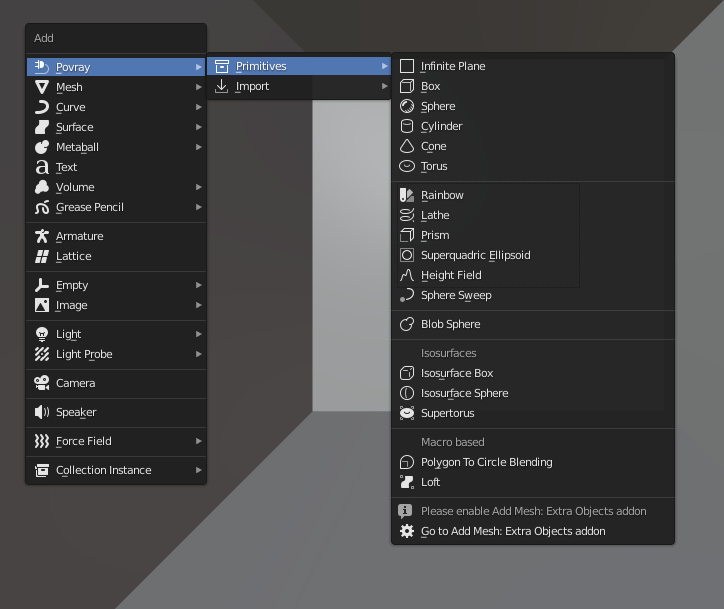
They are mathematically defined as opposed to Triangle meshes. The sphere, torus, cylinder or cone side will always be round and smooth when rendered, no matter how close you get, and regardless of their appearance in the 3D view, which is only a proxy.
These objects are the type of objects that get created when you import a POV-Ray file, so that ideally, you could "exchange" data back and forth between POV-Ray and Blender.
The rendered plane is actually infinite, but represented by a proxy in the 3D view, which is just very big, but still finite. Please report if you'd rather have a différent default scale.
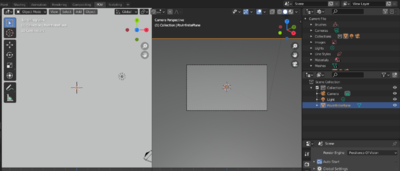 | |
|
Based on a mesh cube the object can be transformed using move/rotate/scale
The sphere has a radius parameter, a location and a scale.
In POV-Ray, cylinders are defined by radius, base point and end point. For convenience, move/rotate/escale can be used to the same effect.
Cones have a basis radius and end radius
Torus has a main radius and a section radius.
This is a surface generated from the combination of three mathematical equations
The rainbow is a view dependant effect
This object behaves like the Blender screw modifier to create surfaces by revolving a spline except instead of being tesselated beforehand, it follows the mathematical curvature of the spline so you won't see any polygons no matter how close you zoom.
This is a POV-Ray primitive that simply extrudes a shape
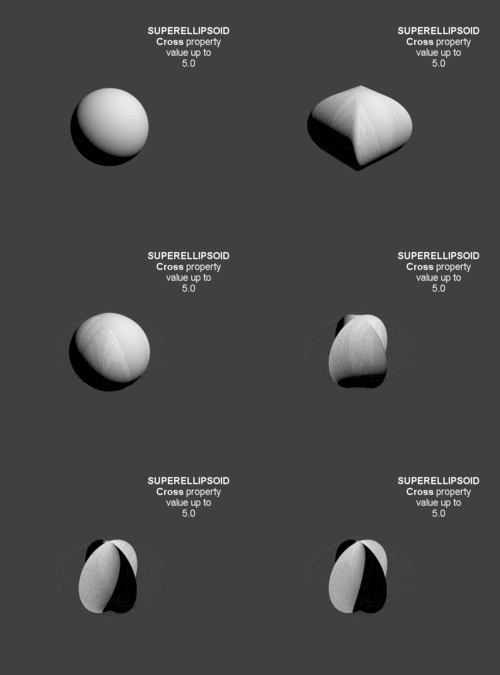
A quite versatile tool that can provide quick models for cushion or star shaped objects
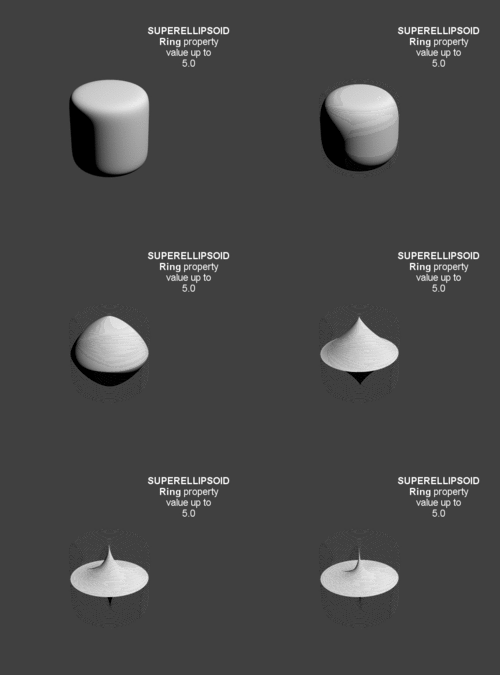 
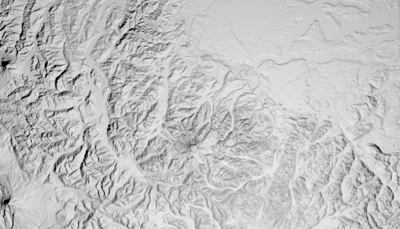
This is a displacement of a surface following a texture. Tessellation also happens at render time, so you don't need to subdivide anything before.
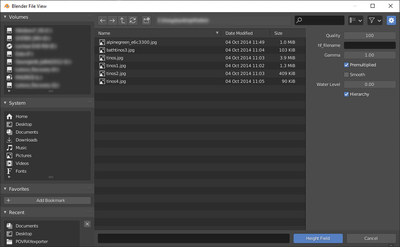 | |
Read More
This POV-Ray primitive sweeps a sphere a long as spline to create an interpolated form that can have variations of radius along the spline.
It is also used to export hair strands.
Like Blender Metaballs
In POV-Ray isosurfaces are objects that can combine and be deformed using pigments or equations
Isosurface Box
An isosurfacecomponent shaped as a box
Isosurface Sphere
An isosurfacecomponent shaped as a sphere
Supertorus
An isosurface shaped as a torus with deforming parameters equivalent to those of t.
Parameters (POV-Ray names):
- MajorRadius, MinorRadius = Base radii for the torus.
- MajorControl, MinorControl = Controls for the roundness of the supertorus. Use numbers in the range [0, 1].
- Accuracy = The accuracy parameter.
- MaxGradient = The max_gradient parameter.
Macro based primitives
Two primitives are actually macros that generate a mesh from curves before render time:
- Polygon to Circle Blending
Parametric surfaces
The primitive requiring user to activate Add Mesh: Extra Objects addon is Parametric surfaces: that other addon was indeed very well suited to create the 3D view mesh preview, so there was no need to reinvent the wheel. However it is considered bad practice for an addon to enforce activation of another addon so that decision has to be left to the user of activating that other dependency, even though it's still internally shipped with Blender and nothing else has to be done but mere checking of a box at first run (next sessions will remember it). The only consequence is that If you were to enable all addons, Blender would take slightly longer to startup.
Importing POV-Ray files
| 1. From the same ⇧ shiftA menu, you can also import povray files
|
|
| 2. Or otherwise, clicking from the main header menu
|
|
| 3. You can then select one or several files (holding ⇧ shift or pressing B for drag box selection
|
|
Merging POV scripted Animations
link to original tutorial
While Blender is one of the best modelers in existence, it is primarily a polygon modeler. There are some cases when you want to use something like POV-Ray's CSG features, which are very good at pure, mathematical forms. But compositing POV-Ray and Blender output is hard work. However, there is a way to combine animations to one render with Blender's POV-Ray Exporter!
Let's make an (very simple) example case: Spaceship flying out of hangar. We wanted to make a dilating door animation in POV-Ray, spaceship animation in Blender and combine them.
Preliminary function declaration
    def exportCustomCode():
        # Write CurrentAnimation Frame for use in Custom POV Code
        file.write("#declare CURFRAMENUM = %d;\n" % bpy.context.scene.frame_current)
        #Change path and uncomment to add an animated include file by hand:
        file.write("#include \"/home/quantum/povray_animation/animation_include_file.inc\"\n")
The exporter doesn't include an interface to this functionality yet but it's quite usable already.
The folowing lines are from Blender's POV-Ray Exporters file, render.py. The only change you need to do is to write the file path for your own .inc file (which can be named as you want) and check that those two file.write statements are not commented out (i.e. no '#' in the beginning...).
This example uses Linux, so file path is Unix-style, in MS Windows paths are written differently...
Blender animation
500px
500px
We defined 100 frame animation in Blender. Basically just move (linearly) the spaceship.
Of course the world paramaters, lighting and objects materials/textures need to be what POV-Ray needs. Here, they are very basic. No image textures, one light, little ambient light.
POV-Ray animation
#include "colors.inc"

#declare doorpart = difference {
	cylinder { <0, 0, -0.1>, <0, 0, 0.1>, 3 }
	box { <-10, -10, -10>, <0, 10, 10>  rotate <0, 0, (-3*CURFRAMENUM+3)> }
	box { <-10, -10, -10>, <10, 0, 10> }
}

#declare wall = difference {
	box { <-100, -100, -0.2>, <100, 100, 0.2> }
	cylinder { <0, 0, -1>, <0, 0, 1>, 2.9 }
}

object {
	wall
	pigment { Green }
}

#if (CURFRAMENUM<30)
object {
	doorpart
	rotate <0, 0, 0>
	translate <0, 0, 0>
	pigment { Green }
}

object {
	doorpart
	rotate <0, 0, 90>
	translate <0, 0, 0>
	pigment { Green }
}

object {
	doorpart
	rotate <0, 0, 180>
	translate <0, 0, 0>
	pigment { Green }
}

object {
	doorpart
	rotate <0, 0, 270>
	translate <0, 0, 0>
	pigment { Green }
}
#end
We wrote the POV-Ray animation code. This is the animation_include_file.inc which was included in Python code. Note, that CURFRAMENUM is used. It is the animations current frame number in Blender! This way we can know what should happen and when in POV-Ray code.
Here is the resulting animation:
POV-Ray specific concepts
object (geometry+material)
Objects are the building blocks of your scene. There are a lot of different types of objects supported by POV-Ray. they are also sometimes called primitives. The mesh object often exported from Blender is just one of the possible primitives supported by POV, but it's one that allows to make the most profitable use of the exporter because a sculpted mesh is easily done in Blender interface and practically impossible to do with POV-Ray alone. The second stage of the exporter's development will allow to use more POV native primitives through Blender interface.
In any case the pov object contains the geometry and can also have the material block, if there is one, at the same hireachical level. This type of construction could be compared to Blender use of "Object Material"
material (interior+texture)
In POV-Ray, there used to be only texture properties inside an object and interior properties such as Index of Refraction could be declared in the same block.
But the developers thought "It is totally illogical to have a ray enter an object with one index or refraction and then recalculate with another index" in the case of multitextured objects.
Nowadays, POV-Ray texture still contains the properties ruling interaction between an object and its environment, such as reflectivity, roughness etc. while Interior stands for internal properties that have an incidence on the light that crosses the surface: index of refraction, media scattering or absorbing light, etc.
For easier reference with a single identifier in a texture library, a wrapper around texture and interior has been created which we call 'material'
texture (pigment+normal+finish)
POV-Ray textures are combinations of pigments, normals, and finishes.
Pigment is the color or pattern of colors inherent in the material.
Normal is a method of simulating various patterns of bumps, dents, ripples or waves by modifying the surface normal vector.
Finish describes the reflective properties of a material.
pigment / normal
finish
A little more powerful as it can be patterned, that is two finishes can be mixed depending on values of a bitmap file
texture_list
If the texture is not put inside a material statement, it can be put directly inside the geometry of the object, it allows to apply different textures to different parts of the object through a texture list and texture indices assigned per face.
The exporter exploits this feature for meshes with several materials. This type of construction could be compared to Blender's Data material. However, in POV-Ray, all the textures still share one common set of interior properties per object.
The most complex blender materials case
Blender materials being able to map alpha, diffuse, normal, specular, specular hardness, specular color each depending on a different bitmap file value, they are in their native logic, impossible to translate in POV (e-g: map with various specular colors)
What most complex material case remains translatable?
On various parts of a mesh, thanks to texture lists,
shader emulation alpha to filter
pigment normal
diffuse color
blurred reflection
all this duplicated with min and max specular
mapped at both extremes of a bitmap or procedural value.
a colored specular, which is the NPR feature turns off texture influences.
not to be confused with metallic keyword which does a photorealistic colored spec and still allows texture influences
what is impossible in POV: map with various specular color What remains: most complex exported material case
Renderer versions
UberPOV features can be written to a POV file inside the scope of a specific condition to enable the files to be retro compatible with POV-Ray 3.7 syntax:
reflection { 1 metallic
    #ifdef(unofficial)
        #if(unofficial = "patch")
            #if(patch("upov-reflection-roughness") > 0)
                roughness 0.1
            #end
        #end
    #end
    }
It enables you to export a file for UberPOV while still rendering it with standard POV, but this solution makes files slightly heavier and longer to parse, so it might change in the future: cleaning up exported pov when the features get available in all versions.
Standard Script Information
Blender Normalized Addon Info
| name |
POV@Ble (render_povray repository)
|
| tooltip |
Renders Blender scenes with POV-Ray 3.7, and edits native POV files
|
| menu |
Renderer rolldown menu
|
| usage |
If POV-Ray 3.7 is installed, activate the addon in the menu Choose it as the renderer and render with F12
|
| version |
0.1.8
|
| author |
Campbell Barton, Silvio Falcinelli, Maurice Raybaud, Constantin Rahn, Bastien Montagne, Leonid Desyatkov
|
| blender version |
2.79b to 4.4
|
| category |
Render, Pipeline, Text Editor, etc.
|
| license |
GPL3
|
| distribution |
Extension
|
| note |
After May the 10th 2011, some development to the script limited backwards compatibility: If you set up some files prior to that and always use the latest exporter from SVN. It is advised to run the update script and resave your scene with the new version: get to the search bar with Space and type pov to access this command.
|
| exe |
Blender (Embeds the necessary Python interpreter) + POV-Ray 3.7/3.8
|
| download |
- You can download the latest development snapshot of the addon at once by clicking
-->HERE
|
| modules |
Only Python Standard Library modules and the ones shipped with Blender are used. No outside package should have to be installed
|
| dependencies |
Requires versions of POV-Ray 3.7+, it won't work directly with POV-Ray 3.6
|
| data |
Test scenes available upon request
|
| bugtracker |
Gitea
|
| warning |
Please report any bug or request!
|
| link |
povray.org
|
| releaselog |
Here are the logs of every commit to the source
and for specific Releases
|
| issues |
Many properties have been broken in Blender 2.8... Use 2.79b if you want to be safe
|
|
|